Showing posts with label Entertainment. Show all posts

Sunday, June 16, 2013

Review: Convert almost any entertainment file to another format with free Adapter

AppId is over the quota
Adapter With so many devices and so many OSs, you may be done with fun if you can't convert an entertainment file format. Adapter converts audio, image video, and even game files to keep the good times rolling.

Download Now

Just think for a moment how many devices and operating systems you use in a day. Now you may jump from a Windows PC to a Mac (or vice versa). Or use an iPhone or Blackberry?  Or maybe you use an Android or Kindle Fire? The fact is that with so many systems, being able to do quick efficient no-fuss file conversions to suit the platform you are on has become an absolute-must. This is why Adapter should be on your shortlist of apps to install on your system.

Adapter is made by the same company that brought out the awesome iExplorer, and it comes in PC and Mac editions. The interface of the PC version I tested is straightforward and intuitive, and adding files is as simple as drag-and-drop with your mouse. There are no long complicated user manuals to memorize, no complicated audio codecs to install, no screen resolutions to remember in advance. Adapter is a good example of software that allows you to just add the source file and click the button to go.
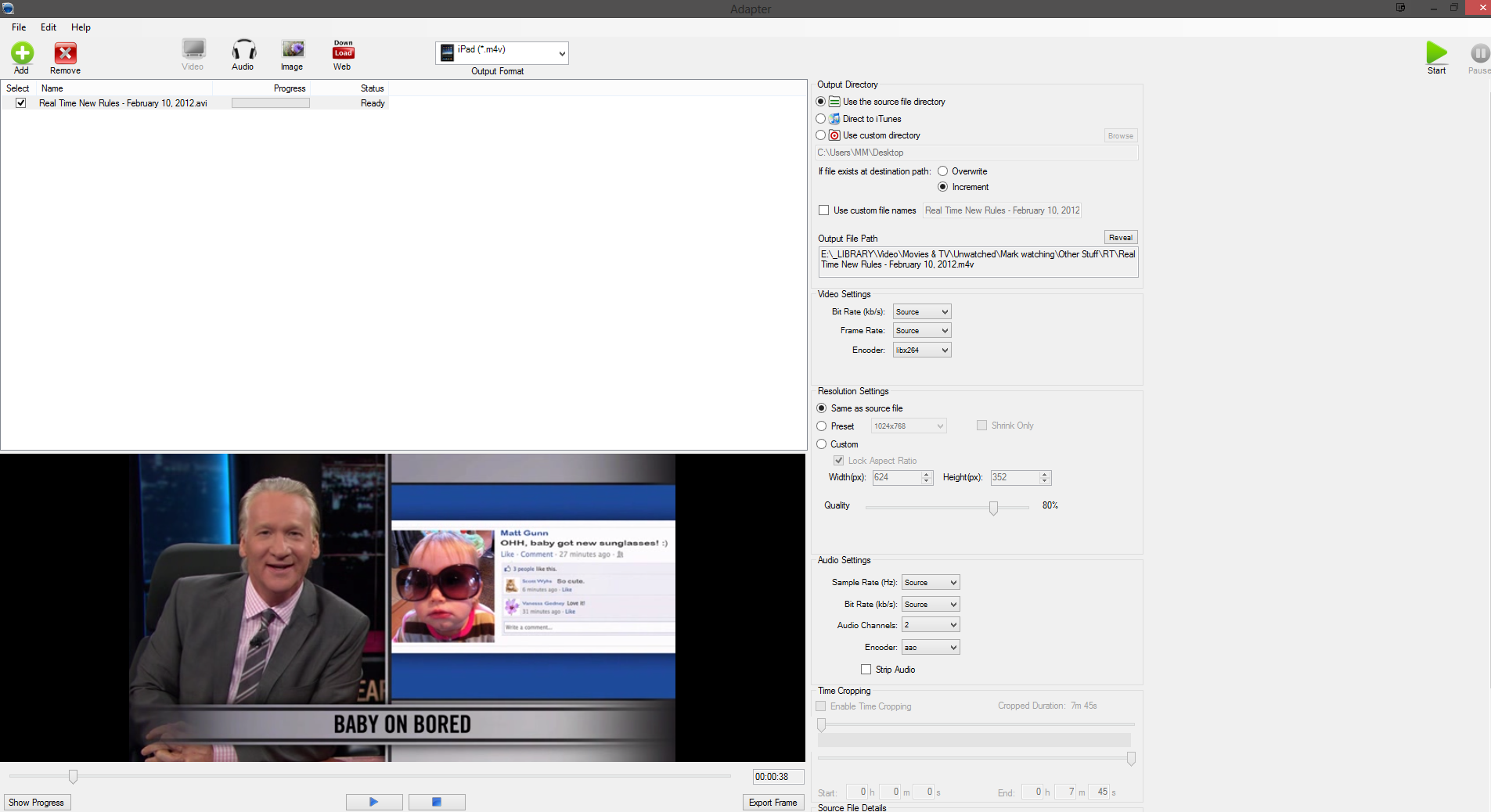
After choosing the type of file and loading the source file, a range of options present themselves to you including the output file format, destination folder and more.

The software has numerous different functions. It can handle video (including DVD files and Flash), images (including animated GIFs) and audio (including iPhone ringtones). It can even convert files for games consoles such as the Playstation, Xbox, and Nintendo Wii. To begin, just choose your format at the top (video, audio, image) then either press the "add" button or drag the file into the main area with your mouse, and drop. Then in the top toolbar, choose the file format you want to convert to, check that the other options are as you want them. You can more or less keep them as they are, with the possible exception of the output directory. I wouldn't recommend fiddling with the default settings unless you know what you are doing. Then press the "start" button and wait for the file to be converted.

On the whole, Adapter converts files really fast, unless of course you are converting a huge video file which will take slightly longer. But if you are converting say an MP3 file or a YouTube video, then it doesn't take very long at all.

Adapter also lets you edit an MP3 file and convert it into an m4r file, so you can send it to iTunes as an iPhone ringtone. When you have dragged the source audio file into Adapter, look to your right and use the sliders to choose the size of file you want converted into the ringtone. Then choose m4r as the output format and away you go again. You can even tell Adapter to send the completed file directly to iTunes on your computer.

If you are using Adapter to make an iPhone ringtone, you can use this cropping tool to get the right length of file.

The final feature Adapter offers is a lightweight browser which you can use to go to YouTube and download videos directly to your Adapter installation. From there you can download as a video or extract the audio. Even though Adapter told me that the browser was "outdated" and "no longer supported," it still worked perfectly fine.

The only real con that was readily apparent was that trying to convert MP4 files resulted in the app crashing. It seems as if Adapter doesn't like converting MP4 files at all. The developer maintains however that this should not happen, and was unable to replicate the problem.

If you were planning to use Adapter for converting MP4's, and you encounter the same problem as I did, there's an easy fix: Use SUPER instead, which converts MP4 files to AVI in a flash.

There are lots of file converters on the market, some good, many bad. Adapter definitely firmly falls into the good column and is worth using, especially considering that it is free. You can't argue with that.


View the original article here

Thursday, April 7, 2011

2 New Videos on the Connected and Entertainment Experience with Microsoft Products

Back in December, I posted about a really neat video directed by Keith Rivers that highlighted how up and coming indie artist Andrew Belle used Windows 7 and Windows Live to create a song. If you liked that video, you won’t want to miss these two new videos that were also directed by Keith that go beyond Windows 7 and Windows Live to highlight the entire breadth of Microsoft products being used together to create some amazing experiences. These videos, along with the Andrew Belle video, were showcased at the Microsoft booth at CES with all the PCs and devices that were used.

Video 1: Making of a Flash Mob

Have you ever wondered what kind of work goes in to coordinating and planning a flash mob (click here if you don’t know what a flash mob is)? Using PCs such as the Dell Inspiron Duo (read Ben’s review) and the Samsung QX410, as well as their Windows Phones - local choreographers and dancers here in Seattle use Windows Live (Messenger, Mesh) and Kinect to plan and coordinate a flash mob at Pioneer Square. Pretty impressive.

Video 2: Road Trip to Mt. Hood

In this video, skiers and snowboarders head off on a road trip from Seattle to Mt. Hood to hit the slopes. While on the road, and then even on the slopes and from the lodge at an elevation of 6,000 feet, they use their Windows Phones, Kinect and Xbox, and the ASUS Eee Slate (read Ben’s review) to stay entertained with music, movies, and games.

I got on the phone last week with Keith to talk about these videos and get some backstory. For these two videos, Keith told me his initial approach was to do something similar to what they had done with the Andrew Belle video but with 2 new musicians. However as he began to concept the videos with Microsoft, they decided they wanted to focus on other real stories that branched beyond the music industry: one about coordinating a flash mob and another following a group of skiers on a road trip to Mt. Hood. Keith not only directed the videos but wrote both of them as well and he did so in just a matter of a few days. He had about a month to do these videos which included the writing all the way to finishing post-production and handing off the final videos to us (Microsoft) for CES.

Keith used resources around him for these videos. Keith happened to be good friends with Bobby Bonsey and Egan Orion who are flash mob choreographers and producers in Seattle. He had been fascinated by the idea of a flash mob and thought following the design and production of a flash mob could be really interesting for people to see. And Keith also grew up skiing in the Pacific Northwest and had done some really great videos early in his career on freestyle skiing. He also knew of some local skiers and snowboarders who participated in competitions in the area. So deciding to do a video on a flash mob and another on skiing came as easy choices. For the skiing video, he chose the location of Mt. Hood because of the weather and because it had a beautiful lodge that gave an antique, historic look he was looking for.

Each video shoot had its challenges. The shoot for the flash mob video was done pretty fast and because of that, Keith called it “one of the most insane productions we’ve ever done”. For the Mt. Hood shoot, getting the live-action shots of the skiers and snowboarders was pretty challenging and the lift shots proved to be really challenging with the person holding the camera literally hanging off the back to film. His team was also shooting live products in use, which sometimes took extra time to light correctly to adjust for the brightness and contrast of the screen. But on the other hand, Keith also recalls how much fun it was for his crew and the people in the videos to get to use some of the newest products like the Dell Inspiron Duo and Windows Phone 7, and how addicting Kinect Sports was and easy to pick up.

In making these videos, Keith worked with producer Rebecca Davis, TJ Williams Jr. who was their Director of Photography, Nick Pezzillo who was the editor for the flash mob video and Daniel Soderberg who was the editor for the Mt. Hood video.

Keith says he was gratified that Microsoft gave him the opportunity to go out and do some really creative stories with these videos. I certainly enjoyed them and am often fascinated by the backstory behind videos like these. I hope you enjoyed hearing the backstory for these videos!


View the original article here