Showing posts with label cloud. Show all posts

Saturday, November 2, 2013

Prezi Desktop review: Animate your presentations, even when you're away from the cloud

AppId is over the quota

Once you notice your colleagues are catching up on their sleep during your PowerPoint presentations, you know you need Prezi Desktop. Using this software, you can wake up your presentations using animation that doesn't suck. Forget transitions and effects like dissolve and fly-in, Prezi Desktop focuses in on your important points within your slides, like actually visually focuses in.

Prezi Desktop screenshotMany of Prezi Desktop's 50+ templates include 3D animation. In this one, you start out in a forest and then move through the trees.

Prezi Desktop is similar to the online Prezi, but as you might guess from the name, it doesn't require an Internet connection after the initial registraion. This means that any storage limits are on your end, not on Prezi's cloud. It's also awfully handy to work offline when you're incorporating last-minute changes on a flight or at the slightly-too-rustic site for the company retreat.

The program opens with over 50 slide templates to choose from, all of which include animation built right in, and many of which include photo-realistic graphics or 3D aspects. You add text, images, and YouTube movies to areas of the slide and create a path for the animation to follow. Prezi flows seamlessly between these areas.

Prezi Desktop screenshotFilling in Prezi Desktop slides in a simple click-and-type affair.

Some of Prezi's 3D effects are better than others, with a few giving the impression of rotating the base image rather than actually occurring in three dimensions. You can add shapes and drawings from Prezi's library but they are not editable, so if you want to create a very unique Prezi you'll also need software to create PDF, PPT, or image files to import. And you may want to stick to a very basic Prezi if you're presenting to the National Association of Motion Sickness Sufferers, because the flow of the presentation can be disconcerting.

With credit card information in hand, Prezi Desktop offers a 30-day free trial of the Enjoy ($59 annually) or Pro ($159 annually) subscription, as well as the completely free (no credit card needed) Public version. Once the 30 days are up, only the Pro version supports Prezi Desktop. Your presentations are all public with the Public version of Prezi, and you get only 100MB of storage per user. With Prezi Desktop Enjoy and Pro subscriptions, you can keep your presentations private, eliminate the Prezi branding, and receive 500MB (Enjoy) or 2GB (Pro) of storage space.

Prezi Desktop screenshotYou can tweak the text formatting in your Prezi Desktop slides.

Prezi Desktop can get pricey, and it won't fix a really bad presentation, but it will certainly help keep your visuals—and your audience—focused. Plus you'll never be bothered by snoring during a presentation again.

Note: The Download button takes you to the vendor's site, where you can download the latest version of the software.


View the original article here

Tuesday, October 29, 2013

Cloud Services you can trust: Security, Compliance and Privacy in Office 365

AppId is over the quota

 When you make a decision to place your trust in a cloud services provider for productivity services, security, compliance, and privacy are top of mind. With over a billion customers on Office and decades of experience running online services, we understand what it takes to earn and continue to maintain your trust and confidence in Office 365.

Our construct for security, compliance and privacy in Office 365 has two equally important dimensions - Built-in capabilities that include service-wide, technical capabilities, operational procedures and policies that are enabled by default for customers using the service and Customer controls that include features that enable you to customize the Office 365 environment based on the specific needs of your organization.

We will look at Built-in capabilities and Customer controls for each of the key pillars of trust - Security, Privacy and Compliance - in more detail below.

Security

Security of our customers' information is a key trust principle. We implement policies and controls to safeguard customer data in the cloud and provide unique customer controls that you can use to customize your organizational environment in Office 365.  

As an Office 365 customer, you will benefit directly from in-depth security features that we have built into the service as a result of experience gained from years of building enterprise-grade software, managing a number of online services and billions of dollars in security investments. We have implemented technologies and processes that are independently verified to ensure high security of customer data.

Some key aspects of our built-in security capabilities are:

Physical security - We monitor our data centers 24/7 and we have technologies and processes to protect our data centers from unauthorized access or natural disastersSecurity best practices -We use best practices in design like Secure Development Lifecycle and operations like defense-in-depth to keep your data secure in our data centersData encryption - Every customers' email content is encrypted at rest using BitLocker Advanced Encryption Standard (AES) encryptionSecure network layer - Our networks are segmented, providing physical separation of critical back-end servers from the public-facing interfaces at the same time our Edge router security detects intrusions and signs of vulnerabilityAutomated operations like Lock Box processes - Access to the IT systems that store customer data is strictly controlled via lock box processes. This access control mechanism is similar to a system where two people have to turn the key for an action to be allowed.

As a result of Office 365 offering productivity services to a wide range of industries, we have built both features and choices that you can control to enhance the security of data based on the needs of your organization. 

Some key aspects of our customer controls for security are:

Exchange Hosted Encryption - Enables delivery of confidential business communications safely, letting users send and receive encrypted email directly from their desktops as easily as regular email.S/MIME - Enables encryption of an email messages and allows for the originator to digitally sign the message to protect the integrity and origin of the message. As part of our continued investment in security technologies that Government and Security conscious customers care about, we are adding support for S/MIME for Office 365 in the first quarter of Calendar Year 2014.Rights Management Services - Enables a user to encrypt information using 128-bit AES and use policies on email or documents so that the content is appropriately used by specified people.Role based access control - Allows administrators to enable access to authorized users based on role assignment, role authorization and permission authorization.Exchange Online Protection - Allows administrators to manage your company's Anti-virus and Anti-spam settings from within the Office 365 administration console.Identity Management - Provides organizations with various options for identity management such as cloud based identity, identities mastered on-premises with secure token based authentication or hashed passwords to integrate into the Office 365 identity management system based on the security needs of your organization.Two factor Authentication - Enhances security in a multi-device, mobile, and cloud-centric world by using a second factor, such as a PIN, in addition to the primary factor which is identity.

Another key principle of Office 365 trust is Compliance.  It is expected that commercial organizations have regulations and policies that they must comply with to operate businesses in various industries. These policies can be a mix of external regulatory requirements that vary depending on industry and geographical location of the organization and internal company-based policies.  Office 365 provides built-in capabilities and customer controls to help customers meet both various industry regulations and internal compliance requirements.

Office 365 stays up-to-date with many of today's ever-evolving standards and regulations, giving customers greater confidence.  To bolster this and to continue earning your confidence, we undergo third-party audits by internationally recognized auditors as an independent validation that we comply with our policies and procedures for security, compliance and privacy.

Some key aspects of built-in compliance capabilities are:

Independently Verified - Third party audits verify that Office 365 meets many key world-class industry standards and certificationsControl framework - We follow a strategic approach of implementing extensive standard controls that in turn satisfy various industry regulations. Office 365 supports over 600 controls that enable us to meet complex standards and offer contracts to customers in regulated industries or geographies, like ISO 27001, the EU Model Clauses, HIPAA Business Associate Agreements, FISMA/FedRAMP Comprehensive Data Processing Agreement - Our Data Processing Agreement comprehensively addresses privacy and security of customer data, helping customers comply with local regulations

We provide Compliance controls within the service to help our customers comply based on the policy needs of their organization. 

Some key customer controls for compliance are:

Data Loss Prevention - Helps customers to identify, monitor and protect sensitive data through content analysisArchiving - Allows organizations to preserve electronically stored information retaining e-mail messages, calendar items, tasks, and other mailbox itemsE-Discovery - Permits customers to retrieve content from across Exchange Online, SharePoint Online, Lync Online, and even file shares

Privacy is our third trust principle.  As more and more customers are relying on online service providers to keep their data safe from loss, theft, or misuse by third parties, other customers, or even the provider's employees, we recognize that cloud services raise unique privacy questions for businesses.   

To meet your needs, we are continually developing technologies to enhance privacy in our services. We call this privacy by design - which is our commitment to use best practices to help protect and manage customer data. 

Key built-in capabilities and principles of Privacy in Office 365 are:

No Advertising - We do not scan email, documents, build analytics or data mine to build advertising products. In fact, we do not use your information for anything other than providing you services you have subscribed for.Data Portability - As an Office 365 customer, your data belongs to you, and you can export your data at any time with no restrictions. We act only as a data processor and provider of productivity services, not as a data owner Notice and Consent - When we act upon your data, we let you know why and we ask for permission in advance or redirect any enquiries to our customers unless legally prevented to do so.Breach Response - We have strong, tested and audited processes to inform you if there is a breach and remediate issues if they occur.Data Minimization - We strive to minimize the actual amount of customer data that our internal teams have access to.

In addition to built-in capabilities, Office 365 enables you to collaborate through the use of transparent policies and strong tools while providing the distinct ability to control information sharing.

Some examples of customer controls for privacy are:

Rights Management in Office 365 - Allows individuals and administrators to specify access permissions to documents, workbooks, and presentations. This helps you prevent sensitive information from being printed, forwarded, or copied by unauthorized people by applying intelligent policiesPrivacy controls for sites, libraries and folders- SharePoint Online, a key component service of Office 365 that provides collaboration functionality has a number of privacy controls. One example is that SharePoint Online sites are set to "private" by default. A second example is that a document uploaded to a SkyDrive Pro is not shared until the user provides explicit permissions and identifies who to share with.Privacy controls for communications - In Lync Online, another key component service that provides real time communications in Office 365, there are various administrator level controls as well as user level controls to enable or block communication with external users and organizations. One example is blocking access to federation in Lync. Similarly there are controls throughout the service for the admins and users to ensure privacy of their content and communications.

At Microsoft, we have been building Enterprise software for over two decades and we run over 200 online services. We bring all of this experience to Office 365 to give you industry leading capabilities in security, compliance and privacy. In addition, we take the advantage of scale and continuous feedback from providing services to a diverse customer base across industry and geography to constantly learn and improve the Office 365 services. Security, Compliance and Privacy are the key pillars of the Office 365 Trust Center (the other two pillars being Transparency and Service Continuity). Customers can have confidence that Microsoft is a thought leader and will continue to make deep investments to protect customers in the cloud.

Learn more about security, compliance, and trust in this weeks Garage Series: Explaining data security and your control in Office 365.

Learn more about recent compliance agreements with the announcement for the state of California and Microsoft signing the CJIS security policy agreement.

-- Vijay Kumar


View the original article here

Tuesday, June 18, 2013

How to encrypt your cloud storage for free

AppId is over the quota
BoxCryptor One thing that stops a lot of people from using cloud storage companies is the perceived lack of security. BoxCryptor's encryption helps fill that need.

Download Now

If you want something done right, do it yourself. That may sound trite, but it rings true as advice for securing files that you've stored online. Several recent incidents—including breaches of Dropbox and iCloud—underscore the fact that, even with built-in encryption and SSL transfers, cloud storage providers can't perfectly ensure the safety of your data.

Luckily, you can take cloud security into your own hands.

A few different tools can help safeguard the privacy of your data when you store it on a remote server. One of our favorites is BoxCryptor, an easy-to-use encryption program that works with all of the most popular cloud services, is free to use (though you can pay for upgrades), and helps keep your data safe.

BoxCryptor is basically a virtual hard disk that encrypts files on the fly using 256-bit AES encryption. Unlike TrueCrypt, another popular on-the-fly encryption tool, BoxCryptor encrypts individual files, not an entire volume or container. Consequently, your BoxCryptor-encrypted files sync with your cloud storage service immediately after you save them, whereas TrueCrypt syncing occurs only after you finish encrypting an entire volume.

BoxCryptor encrypts and decrypts your files locally, and it doesn't transmit your password to third parties. As a result, your files remain unreadable to outsiders even if hackers manage to steal your password or otherwise breach your cloud storage provider's defenses.

Setting up BoxCryptor is fairly painless, but the service has a few subtleties that could throw you for a loop. I'll get into those after discussing the differences between the various BoxCryptor offerings and outlining how to get the encryption software up and running.

BoxCryptor is available in three editions: a free version, a $40 Unlimited Personal version, and a $100 Unlimited Business version. Free Android and iPhone apps are also available.

It's hard to argue with free.

The free version, which should suffice for many people, permits you to operate a single virtual hard disk for encrypting and decrypting files. Upgrading to the Unlimited Personal version introduces multiple virtual drives, so you can access several encrypted folders simultaneously; it also lets you encrypt file names, not just file contents. The Business license is the same as the Unlimited Personal license, but it includes a legal clause that allows you to use it in the workplace.

The first step in setting up BoxCryptor is to figure out how to download the right program from the BoxCryptor website. The row of gray icons at the top of the download page looks like a simple informative image, but you must click the icon of your operating system to snag the installation file.

Passwords: You just can't live without 'em. 

Once you have it, double-click the file to start the installation wizard, and then choose Create a new BoxCryptor folder. The next screen will ask you to choose a location for the encrypted folder. You can choose an offline local folder as the destination if you like; but BoxCryptor's big draw is that it works with any cloud storage service that creates a local directory on your PC, including the desktop clients for Dropbox, Google Drive, SkyDrive, and Sugar Sync. Most cloud storage services create a local directory in C:/Users/*UserName by default. After you choose the destination folder, enter a name for the BoxCryptor folder that you're creating.

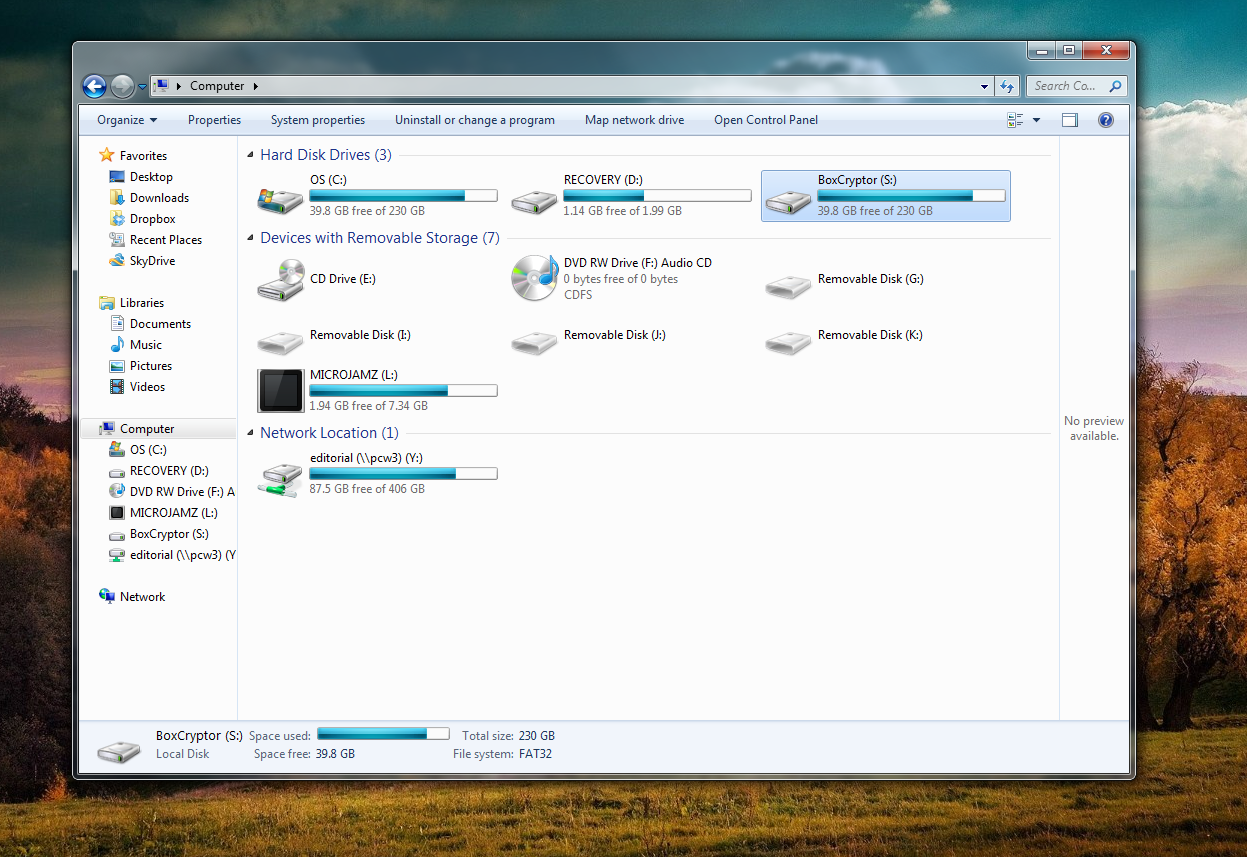
Next, you'll need to choose a drive letter designation for the virtual disk. Be sure to pick one that you aren't already using. (I chose S: for SkyDrive.) Finally, create a password, and you're good to go. I strongly recommend creating a backup of your BoxCryptor configuration file when prompted to do so, since you'll lose the ability to descramble your data if you accidentally delete the config file and don't have a spare copy handy.

To complete the installation process, reboot your PC after closing the wizard. The virtual drive will appear alongside your physical drives when the computer restarts.

If you simply drag files into the BoxCryptor.bc folder that the software creates in your cloud storage directory, the files won't be encrypted. Instead, deposit your files in BoxCryptor's virtual drive (S:, in my case). Doing so will also make them appear in your cloud storage folder in encrypted form.

BoxCryptor creates a virtual drive that resides alongside your physical drives. 

Similarly, the only way to unencrypt your files is to withdraw them via the same virtual drive. If you try to snag your files directly through the BoxCryptor.bc folder they'll remain encrypted, and you won't be able to read them.

This arrangement makes accessing your files on the road a bit of a hassle, but even the free version of BoxCryptor allows you to reach cloud-stored encrypted folders, assuming that you have both BoxCryptor and your cloud service's desktop client installed on your PC. BoxCryptor also offers an Android app for accessing encrypted SkyDrive, Google Drive, and Dropbox files after you enter your BoxCryptor password. An iOS app is available as well, but it works only with Dropbox.

Since both the encrypting and the decrypting occur on BoxCryptor's virtual drive, you'll likely have no reason to wander into the BoxCryptor.bc folder stored in your cloud drive. If you do, however, be careful not to move or delete the encfs6.xml file. That file holds the configuration key for decrypting your files. If you move or delete it, you won't be able to decrypt your files.

Anyone who purchases BoxCryptor Unlimited can run multiple BoxCryptor virtual drives simultaneously, whereas users of the free version are limited to a single virtual drive. Does that mean you can encrypt or decrypt files at only one cloud storage service or offline location? Not at all. It just means that you can have only one virtual drive operating at a given time. Though you can create several encrypted folders, you can encrypt or decrypt files for only one of them at a time.

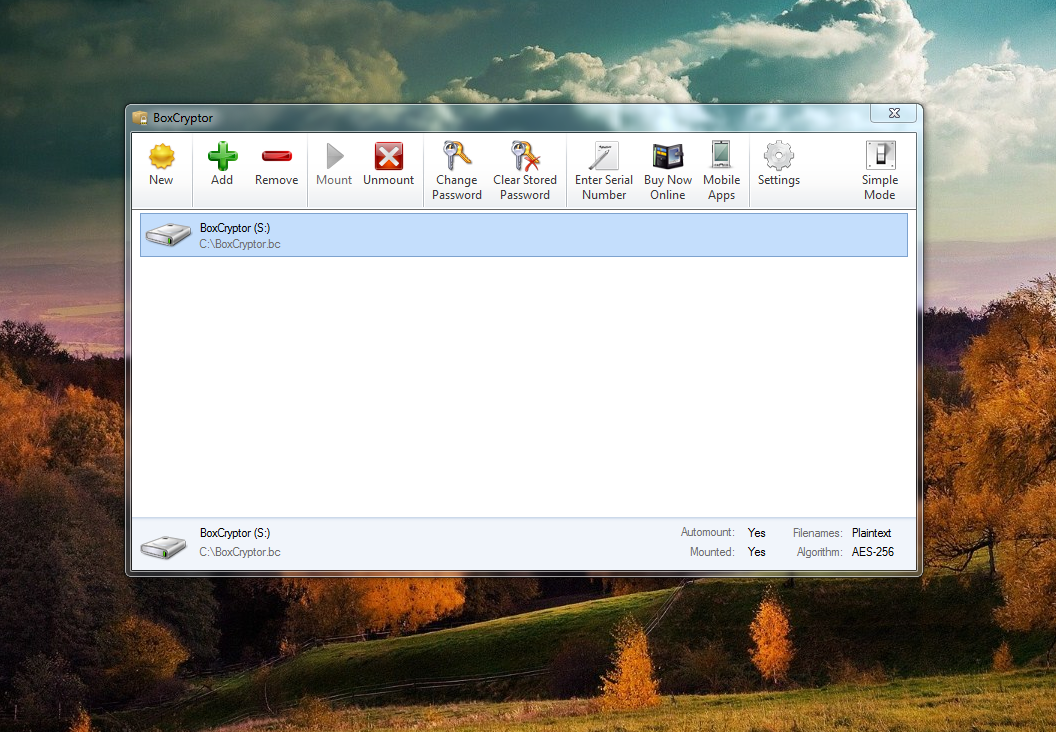
To create another encrypted folder in a second location, right-click the BoxCryptor icon in your system tray and select Preferences. Next, enter Advanced Mode—ignoring the warning that the program displays—and click the icon for your encrypted virtual disk. The Remove option will turn red and become active; click it. Poof! Your drive will disappear from the list. Don't worry, the actual files (and their encryption key) won't be deleted.

You can use the Advanced mode to add and remove BoxCryptor virtual drives, allowing you to juggle encrypted folders on multiple cloud services at once.

Now, click the New icon. The installation wizard will pop back up. This time, create another encrypted folder for a different cloud service or offline folder than you did originally. For example, I created an encrypted folder in my Dropbox account to complement the BoxCryptor folder I'd already created in my SkyDrive account. Complete the creation process as you did before, by creating a password and selecting a virtual drive designation. Advanced options will pop up during the process, but you needn't worry about those unless you're curious about the software's niche uses. Bonus: You don't have to reboot the second (or later) time you create a BoxCryptor folder.

When you're done, a BoxCryptor.bc folder will appear in the new location, and a BoxCryptor virtual drive will appear on your computer, just as before. Use this second encrypted folder just as you did your first one, adding and removing files via the virtual drive, not via the BoxCryptor.bc folder itself.

What if you need to access or add a file in the encrypted folder you created the first time around? That virtual drive—though not the folder itself—disappeared when you removed it from the BoxCryptor list to create your second encrypted folder. But reconnecting to your previously created BoxCryptor folders is easy.

First, remove your current virtual drive in the Advanced Mode, as you did before—only this time click Add instead of 'New' when you're done. When the program asks you to choose the location of a BoxCryptor folder, select your originally created BoxCryptor.bc destination. (That's the one in SkyDrive, in my case.) Next, choose a letter for the virtual drive you're creating, ignore the advanced options, and enter your password for the encrypted folder when prompted. Immediately, a virtual drive connected to your original BoxCryptor folder appears on your computer, allowing you to encrypt and decrypt your files to your heart's content.

Deselecting and reactivating virtual drives in order to jump between multiple encrypted folders will get the job done, but repeatedly running through the reactivation process gets very tedious if you bounce between different services frequently. If you want to maintain several encrypted folders and you plan to use them often, I highly recommend upgrading to the $40 Unlimited Personal license—both to reduce activation headaches and to support the developers of this excellent piece of software.


View the original article here

Saturday, May 11, 2013

Project available as 3 flexible cloud services through Office 365

AppId is over the quota

We're proud to announce the availability of Microsoft Project as a flexible cloud service, delivered by Office 365. For the first time, customers can sign up for flexible plans, get started quickly and use the full capabilities of project and portfolio management without adding IT complexity.

There are 3 Project cloud services to choose from:

Project Online is a flexible online solution for project portfolio management (PPM) and everyday work. With a convenient subscription and delivery through Office 365, Project Online enables organizations to get started, prioritize project portfolio investments and deliver the intended business value—from virtually anywhere on nearly any device.

Project Pro for Office 365 delivers the latest version of Project Professional as a subscription through Office 365. Your software is automatically kept up to date (with options for customizable policies) and users on the go can work from the computer of their choice by streaming the complete desktop client with Project on Demand. Keep deployments simple, benefit from flexible options, and enjoy integration with other Office 365 services like Lync and SharePoint.

Project Online with Project Pro for Office 365 is an all-in-one subscription which delivers the full spectrum of project management capabilities – from task management for teams to project management to project portfolio planning. Now you can have the best of our suite of project management solutions in a single cloud service, without IT overhead and the ability to easily scale from just a few users to your entire organization.

Now that you can get Project virtually anywhere, through Office 365 cloud services, team members can manage their tasks as easily as pressing a check box on their smartphone browser and managers can check reports on the go with just a swipe on their wirelessly connected tablet device.

Collaboration is smooth and effective with Project Team Sites on SharePoint, where colleagues can share documents, comment in newsfeeds, and keep up to date on team tasks and deliverables with the Team Timeline. Real-time communication comes via Lync integration, making it simple to see a team member's status, open a chat dialog, or even initiate a phone call or video conference. Reports are more clean, clear, and easy to create right out of the box than ever before.

Ease your IT management headaches with Project delivered through Office 365. Microsoft offers excellent security, guaranteed uptime, and additional benefits so that businesses can gain efficiency and scale without losing focus on core competencies.

We invite you to visit our new website to learn more about Project, and hope that you’ll contact your nearest Project partner to make arrangements for a live demonstration. It’s our pleasure to share our new products with you and we look forward to maintaining innovative and robust services to meet your project management and project portfolio management needs.

--Mark Sargeant, Product Marketing Manager


View the original article here

Friday, April 12, 2013

Felicity Huffman goes into the cloud with Office 365

Felicity Huffman and the new Office

Desperate Star House Wives and founder of Whattheflicka.com, Felicity Huffman, is busy constantly juggles mother, family and personal responsibility. As a longtime user of Office hung Felicity do things at all their favorite applications and stay organized. She have however until it to Office 365 Home Premium was introduced not as much more valuable to recognize the new Office-reinvented as a cloud service-could be for a woman traveling.

After Bliss ' Office 365 Home Premium breaks the barriers between all the devices, with which we in our family, and I use it, to get things done. "

Read more read the Bliss blog at http://ow.ly/iOXWv


View the original article here

Monday, April 8, 2013

Winzip 17 adds integration with Box cloud storage

AppId is over the quota

Winzip has been a household name in file compression for two decades. WinZip 17 takes file compression and management to the cloud with Google Drive, SkyDrive, and Dropbox integration—and now a new update is available that adds Box to the mix.

WinZip was a pioneer of the freemium software business model—basically providing the software for free, and relying on the moral compass of customers to pay for the product if it proved to be useful to them. I used to download a wide variety of shareware applications following a similar strategy, but WinZip was the first one I ever felt compelled to actually pay for.

WinZip is a leader in file compression and file management.

Over the years, hard drive and flash drives have grown exponentially in size, and the cost of storage has gone down, so the need for a file compression utility has declined. However, the rise of photos and videos—which can be massive files—and the desire to upload information to social networks or cloud storage services has brought it back in vogue. It’s much easier and faster to upload a 100Mb file instead of a 1GB file.

WinZip has evolved to be a much more comprehensive file management tool than it once was. It still provides file compression, but now it also includes the ability to convert documents to PDF, add custom watermarks to PDF files, and post files directly to popular social networks.

Another advantage of WinZip 17 is that it ties disparate services together. Rather than dealing with your PC, Google Drive, Dropbox, SkyDrive, and Box as separate entities, WinZip 17 gives you a single tool from which to manage all of your data no matter where it’s stored.

There are two flavors of WinZip 17, Standard and Pro. The Pro version includes features that strengthen and speed up file encryption, as well as the ability to view photos within a ZIP file without extracting them first, and features that make it easier to transfer and manage photos from supported cameras and mobile devices, among other things.

New WinZip 17 integrates with cloud storage services like Box.

You can get WinZip 17 directly from the WinZip site starting at $30. WinZip 17 Pro is $50. WinZip offers volume licensing discounts for businesses that purchase the software in bulk. WinZip 17 is only available for Windows (XP or later), but there are versions available for Mac OS X, iOS, and Android as well.

Customers who already have WinZip 17 can download an update to add integration with Box cloud storage.

Tony Bradley

Tony is principal analyst with the Bradley Strategy Group, providing analysis and insight on tech trends. He is a prolific writer on a range of technology topics, has authored a number of books, and is a frequent speaker at industry events.
More by Tony Bradley


View the original article here

Sunday, April 7, 2013

Kurt DelBene: The cloud and beyond

AppId is over the quota

Kurt DelBene photoRead Microsoft Office Division President Kurt DelBene's blog about the latest release of Microsoft Office 365 for businesses.

"When we first set out to build this release of Office, we knew it would be the boldest yet. We wanted to create that 'over-the-shoulder envy' that makes your friend or the guy sitting next to you on the plane ask what you're using. In a recent survey, 96 percent of people who were asked said they'd recommend Office to a friend. With the new Office 365 services we know that customers will enjoy entirely new benefits and unique scenarios that only come alive in the cloud."  

Get the rest of the story over on The Official Microsoft Blog.


View the original article here

Thursday, February 21, 2013

Winzip 17 adds integration with Box cloud storage

AppId is over the quota

Winzip has been a household name in file compression for two decades. WinZip 17 takes file compression and management to the cloud with Google Drive, SkyDrive, and Dropbox integration—and now a new update is available that adds Box to the mix.

WinZip was a pioneer of the freemium software business model—basically providing the software for free, and relying on the moral compass of customers to pay for the product if it proved to be useful to them. I used to download a wide variety of shareware applications following a similar strategy, but WinZip was the first one I ever felt compelled to actually pay for.

WinZip is a leader in file compression and file management.

Over the years, hard drive and flash drives have grown exponentially in size, and the cost of storage has gone down, so the need for a file compression utility has declined. However, the rise of photos and videos—which can be massive files—and the desire to upload information to social networks or cloud storage services has brought it back in vogue. It’s much easier and faster to upload a 100Mb file instead of a 1GB file.

WinZip has evolved to be a much more comprehensive file management tool than it once was. It still provides file compression, but now it also includes the ability to convert documents to PDF, add custom watermarks to PDF files, and post files directly to popular social networks.

Another advantage of WinZip 17 is that it ties disparate services together. Rather than dealing with your PC, Google Drive, Dropbox, SkyDrive, and Box as separate entities, WinZip 17 gives you a single tool from which to manage all of your data no matter where it’s stored.

There are two flavors of WinZip 17, Standard and Pro. The Pro version includes features that strengthen and speed up file encryption, as well as the ability to view photos within a ZIP file without extracting them first, and features that make it easier to transfer and manage photos from supported cameras and mobile devices, among other things.

New WinZip 17 integrates with cloud storage services like Box.

You can get WinZip 17 directly from the WinZip site starting at $30. WinZip 17 Pro is $50. WinZip offers volume licensing discounts for businesses that purchase the software in bulk. WinZip 17 is only available for Windows (XP or later), but there are versions available for Mac OS X, iOS, and Android as well.

Customers who already have WinZip 17 can download an update to add integration with Box cloud storage.

Tony Bradley

Tony is principal analyst with the Bradley Strategy Group, providing analysis and insight on tech trends. He is a prolific writer on a range of technology topics, has authored a number of books, and is a frequent speaker at industry events.
More by Tony Bradley


View the original article here

Sunday, January 27, 2013

Retailers weather economic storms in the cloud with Office 365

Office 365 logoRetailers are crucial for the global economy.  Retail is directly or indirectly responsible for 18% of U.S. GDP and supports more than 41 million jobs in the United States alone.

Therefore is the monumental shifts facing retailers are so important for all of us. We have never seen buy such dramatic and tectonic changes in consumer behaviors, settings, and expectations, driven primarily by new technologies, and form factors. With consumers of more options for when and how they shop meant retailers remain competitive must really put customers at the center of their activity and are looking for new ways to get maximum benefit, to create sales and loyalty.

Need to customize, retailers provide a modern sales and service personal and differentiated, seamless gaming experience.  And they need to work with maximum efficiency.

Retailers increasingly contact the cloud to address these challenges.  Yearly in 2012 Gartner CIO survey with tier 1 retail CIO cloud computing - as one of the main tasks which assessed their five technology until 2015. [1]

Increased flexibility. Retailers are 365 to improve employee communication and collaboration with Office, so that they move faster, to share best practices, promotions and new products introduce roll-out. BCBGMAXAZRIAGROUPconnects an Office 365-based system memory manager and employees in over 45 countries, enable to replicate the leading fashion house in rolling out promotions and new products faster as well as on best practices in its network of stores, move faster.

Customer Feedback. Feedback received one of the biggest challenges for retailers has historically from shop partners and customers back to the HQ. Through the combination of HQ and stores with State of the art communication and social tools, can retailers faster and lighter recorded and feedback of our customers to act. Red Robin, could you whine, the leader in social network use and part of Office 365 to collect customer feedback and implement the historic changes in just one month, a process lasted a year or longer.

Cost.Customers reduce costs through the Elimination of infrastructure, reduce travel costs, and streamline operations. At Helly Hansen, they expect annual travel expenses to 10-15% cut, by connecting to Office 365 employees, training and show to roll out the latest store promotions and models.

Larger Flexibility. As retailers scale their workers to the top or bottom of seasonality, business openings or purchase, Office 365 will help remove them flexibility by adding, or reassign licenses quickly and easy to grow. And because it is on familiar Office Tools, the training of employees.

Office 365 has become the go-to choice of retailers for software-as-a-service. Six of the ten largest retailers in the United States (according to the National Retail Federation) use Office 365. Our private clients dealing with more than 8 million people, more than the total population of Hong Kong. This well-known global industry leaders such as Tesco, McDonalds, Starbucks, GAP, j.c., Penney, Helly Hansen, Lowes, Coles, Hallmark, Lojas Renner, and hundreds of other retailers.

HF2. Any retailer can tell you that all one size does not fit. Office 365 is tailored to the needs of each type of users – from the boardroom to the floor in packages room on the retail floor. Company the full experience of office workers get, while workers can get browser Office Web apps from any device with a task.

Modern cooperation. Almost 25% retail and food employees are aged between 16 and 24, and this generation is less likely than social networking or text E-mail communication use. Tesco, the third largest retailer in the world, took this idea. The company experienced a cultural change through the implementation of flexible ways work and younger employees to offer the latest technology tools. With Office 365, employees can quickly access to experts, information, and tools to help them make their work regardless of the location.

Office 365 for enterprises includes Yammer that used social network in 85% of the Fortune 500 leading companies. It offers a familiar experience, which promotes openness and embrace and use with minimal training is in a format that employees share.

High-performance applications. Office 365 includes Lync online and Skype for instant messaging, voice and video conferencing; Outlook and Exchange online for email, calendar, contacts and tasks; Whining for social networking; SharePoint online for a shop portal and collaboration; and Office applications such as Word, PowerPoint, Excel and OneNote. These applications are separate, leading in their categories. Together, they are the most complete productivity, communication and collaboration platform available.

Improved security. Most customers moving to Office 365, increase your security and privacy. Office 365 offers far beyond what anyone can deliver a company on its own, supports all Microsoft Advanced security, privacy and compliance controls.

If you are an Office 365 dealer, we want you to hear. How has Office 365 helped revolutionize your business, helped you think differently about your customer admits and helped you succeed and thrive. Visit the Office 365 – Facebook page and tell us your story, or via Twitter at #Office365.

How is the world economy out of the great recession, the retail plays to take an important role in the global employment and growth. We are honored that so many leading retailers decide Office 365 in this time of reinvention.

-Tracy Issel, General Manager, Microsoft worldwide retail and corporate solutions

 [1] The report 2013 is available check Gartner in January 2013.


View the original article here

Saturday, December 29, 2012

Barilla Group takes a bite of the cloud on Office 365

AppId is over the quota

Office 365 Customer BarillaBarilla Group has been a major Italian food company and a worldwide leader in the pasta market since its humble beginnings in 1877 as a bread and pasta shop in Parma, Italy.

With more than 13,000 employees around the world, the company operates in more than 100 countries. To help ensure their growing workforce remains tightly connected, Barilla explored opportunities to evolve the way their employees communicate, collaborate and interact. After evaluating a handful of cloud platforms, Barilla Group decided to deploy Microsoft Office 365 because of Microsoft's expertise and proven track record of providing enterprise-grade productivity solutions.

With support from Teorema Engineering Srl, a Microsoft Gold Competency Partner, Barilla successfully deployed Office 365 to its employees who are now collaborating, interacting and communicating more easily with Lync Online and SharePoint Online as well as accessing email and documents from any kind of device in any location. Best of all? Barilla's travel costs have been reduced by approximately 30 percent now that people can connect face to face through a click of a button versus a plane ride.  

Building on the success of their deployment, Barilla plans to continue growing the integration between mobile phones and Office 365.

Learn more about Barilla's story here.

Related Information:


View the original article here

Wednesday, December 26, 2012

Adobe Creative Cloud – A Great Choice for Students

No doubt you’ve heard about Adobe Creative Cloud – still wondering what all the buzz is about? In a nutshell, it’s about having all the tools you’ll ever need for going from creative concept to production of A-grade visual projects, winning portfolios or stunning websites. With a special $19.99* monthly membership for students, you get access to all of the Creative Suite 6 tools, web hosting services, fonts, and cloud storage for syncing and sharing creative files. There are lots of reasons to love it:

Get Noticed: Deliver powerful presentations, a personalized web portfolio or a unique Facebook cover photo that everyone is raving about. Because Creative Cloud membership allows access to every Creative Suite 6 tool, the possibilities are endless. Feel a bit overwhelmed? Check out this collection of tutorials to help you get started.Build Job-Ready Skills: According to a U.S. News & World Report article, one of five skills everyone needs to have on a resume is knowledge of Adobe Creative Suite. As you experiment and create eye-catching projects with Adobe solutions, you’re building experience with the latest industry-standard tools like Adobe Photoshop, Illustrator, and InDesign. Now your resume will stand out from the crowd! Check out Adobe’s How-to Channel for more helpful videos and tutorials.Receive Instant Upgrades: No more annual upgrade purchases. Cloud members have access to exclusive updates from Adobe, at no additional cost. When a new release comes out, it is automatically available via the Cloud. For example, we recently added several new features to Illustrator CS6 and just included an iPad publishing service, Adobe Digital Publishing Suite, Single Edition, for making digital editions of magazines and yearbooks.Enjoy a Great Value: Creative Cloud membership is now available for students at $19.99 per month – that’s less than a night out with friends! The CS6 Master Collection would cost you about $800!

 So what are you waiting for, check out Adobe Creative Cloud here!

*Limited time only, offer ends November 4, 2012


View the original article here

Thursday, November 29, 2012

Creative Cloudユーザー向け新機能

Creative Cloud????????? « ??????? function clearSearch() {document.search_form.s.value = "";} .recentcomments a{display:inline !important;padding:0 !important;margin:0 !important;}adobe.com      ??????? / Creative Cloud?????????by Takashi Iwamoto  

View the original article here

Friday, October 19, 2012

Always connected, always ready: Welcome to the cloud, Danish Red Cross! (Video)

AppId is over the quota
a.stbar.chicklet img {border:0;height:16px;width:16px;margin-right:3px;vertical-align:middle;}a.stbar.chicklet {height:16px;line-height:16px;}Office 365 - Always connected, always ready: Welcome to the cloud, Danish Red Cross! (Video) Create or Link an account or Sign in using [f] [t] [in] Please wait... Create or Link an account It only takes a few minutes to join.

You can use your favorite social network to register or link an existing account:


[f] [t] [in] [msg]

Or use your email address to register without a social network:

Username:
Choose password:
Re-enter password:
Email address:
Re-enter email address: Submit

Close Sign in

Sign in with these social networks:

[f] [t] [in] [msg]

Or enter your username and password

Username:
Password:
Forgot your password?

Sign In

Close Account linking Welcome , Do you have an existing blogs.office.com account?

Yes, please link my existing account with for quick, secure access.

Sign in name:
Password:
Link accounts

No, I would like to create a new account with my profile information.

Sign in name:
Email address:
Re-enter email address:
Register

Close Office Blogs Office 365 Home All Blogs Products Word Excel PowerPoint Outlook Access OneNote Publisher Office Web Apps Perspectives Office Casual Office in Education Office Exec Office 365 Subscribe to our RSS feed
RSS for post commentsUnfiltered HTMLUnfiltered HTMLUnfiltered HTML Always connected, always ready: Welcome to the cloud, Danish Red Cross! (Video) by on June 20

When it comes to disaster response, concepts like "collaboration" and "efficiency" are more than corporate buzzwords-they can be matters of life and death.  Fast and reliable communications mean more help for those who need it most in the wake of hurricanes, floods, earthquakes, fire or other calamities.  That's why we're thrilled the Danish Red Cross has deployed Office 365 as centerpiece of its initiative to prepare for and respond to disasters even faster.

The Danish Red Cross' CIO, Claus Olsen, puts it this way: "For us, response time is everything. If we can't communicate, we can't respond.  With Office 365, we can share and act on information in just seconds - at half the cost of our previous solution."

As part of the world's largest humanitarian organization, the Danish Red Cross is a non-profit.  They greatly appreciate Office 365's predictable monthly cost.  Most importantly, their switch from on-premises software to the cloud means money saved on IT can be applied to disaster aid, instead.

It will be fascinating to see how the Danish Red Cross benefits from using Office 365 over time and how these lessons could help similar organizations around the world. Read the full story here and watch the video below.


___________________________________________

--Stephen Bury

See how customers are using Office 365 here.

Interested in trying or buying? Research plans or start a free trial now.

Just want to know more? Visit Office365.com.

Tags: , , Comments

Comments: (loading) Collapse

other Microsoft blogs Official Microsoft Blog Microsoft On The Issues The Windows Blog Bing Community Zune Insider Major Nelson other product blogs Office For Mac Office Web Apps InfoPath Project Visio other Office blogs Office IT Pro Office Updates Office Labs SharePoint Information Workers Legal | Trademarks | Privacy Statement © 2011 Microsoft Corporation. All rights reserved.

View the original article here

Thursday, October 18, 2012

Project Online: In the cloud with Office 365!

AppId is over the quota

clip_image003 Is it challenging to get an up-to-date view of all the projects in your team? Do you want to make sure everyone is focused on the right priorities? Do you manage a large portfolio of projects and want to roll out a structured governance process? Are you a Project Manager who always wants to use the latest version of Project Professional?

As announced on Monday (The New Microsoft Project), Project Online has been designed for you! The service provides the following key capabilities:

· The New SharePoint – Project Online is fully integrated with the New SharePoint, and offers all its benefits, including a clean user experience, pervasive social networking, simple task management capabilities on any team site and a personal view of all your SharePoint and Outlook tasks in one place.

· Project Web App (PWA) – Project Online includes PWA, a web-based Project and Portfolio Management (PPM) solution that helps you select the right projects that align to your business goals, manage your team’s workload, track time spent on projects and get insights through powerful business intelligence tools.

· Project Pro for Office 365 – Project Online offers anytime, anywhere access to Project Professional via application streaming.

Best of all, Project Online is an integral part of the Office 365 family of services, providing the same class of reliability, scalability and availability. We are very excited to introduce this new service, read on for the top 10 benefits:

1. Online PPM: All the rich PPM capabilities including Portfolio Management, Resource Management, Time Tracking and Business Intelligence are available in the cloud, in a secure and scalable multi-tenant environment, with enterprise-grade reliability.

2. Get started quickly: Built on SharePoint Online and designed to work with Office 365, Project Online offers a familiar experience that improves participation and helps people get more done. An intuitive interface along with visual cues helps you begin (or hone) PPM capabilities.

3. Take action: Stay up-to-date in more places and on more devices. You can effortlessly pick up from wherever you leave off with Project Online.

4. Improve governance and control: Project Online enables you to define and select optimal project portfolios that align with your business strategy. Effectively evaluate ideas or measure the strategic contribution of competing requests to determine alignment and streamline project initiation. You can easily create workflows with Visio in SharePoint Designer to model proposal approval processes.

clip_image005
Project Workflow Status

5. Effectively manage resources: See what your teams are doing—even when they’re managing everyday work or ad hoc projects in SharePoint Online. Now you can capture all demand, accurately measure utilization and manage allocation to make objective decisions that align with your strategy.

6. Strengthen everyday collaboration: Share documents, follow people and sites, or keep track of things people are working on. You can bind together the social experiences of SharePoint Online and Project Online to facilitate discussion and information sharing to help people get work done.

clip_image007
Resource Management

7. Seamlessly communicate: Share urgent schedule changes or remedy potential concerns with real-time communications plus instant messaging that’s enabled right within your project. And, in the project site, you can illustrate dates and deliverables on a visual timeline to keep everyone informed and organized at-a-glance.

8. Make data-driven decisions: In PWA, you can see summary dashboards, rich reports, project timelines or entire project plans, to help you manage your projects or a group of programs. Self-service access enables people to quickly mine and aggregate data on many dimensions—to understand risk and align long-term planning with short-term execution needs.


Portfolio Analysis

9. Improve IT management: Project Online simplifies IT management, integrating the administration experience with SharePoint Online so you can easily get set up, add resources, and adjust permissions. And because Project Online separates IT and business settings, your Project Management Office (PMO) or business sponsor are empowered to manage business-specific PPM settings independently.

10. Quickly innovate: Quickly act on new challenges or respond to big opportunities. Shave time off discreet processes. With Project Online, you can choose apps from the SharePoint Store to meet the unique needs of your business.

clip_image011
Project Online Apps

Next Steps

1. Try the new Project Online Preview. We welcome your comments and feedback.

2. Learn how to Get started with Project Online. Register for the Project Ignite training.

3. Connect with the Project community. Subscribe to the Project blog, join us on Facebook, Twitter or ask questions on the Project Online forum.


View the original article here

Saturday, September 22, 2012

New Creative Cloud Features Available

New Creative Cloud Features Available « UK and Ireland Channel News function clearSearch() {document.search_form.s.value = "";} .recentcomments a{display:inline !important;padding:0 !important;margin:0 !important;}adobe.com      UK and Ireland Channel News / New Creative Cloud Features Availableby mabearCCM (7)Creative Cloud Membership (6)New release (7)  

View the original article here

Friday, September 21, 2012

Office and the Cloud

AppId is over the quota


Editor's note: John Jendrezak, Partner Group Program Manager visits the Office Next blog today to discuss some of our efforts in aligning the client suites to the cloud and some of our new delivery options. In future posts we will discuss the other side of this relationship - our investments in cloud services that are designed to improve the productivity experience for both individuals and organizations. We'll also drill deeply into several of these areas with more detailed information during the preview period.

The transitions that organizations and people are making to the cloud enable many new opportunities for sharing with others.  We believe that the best way to leverage the cloud is to connect the best-of-breed applications to feature-rich services.  We do not believe that a one-size-fits-all browser based solution is suitable to meet the needs of both work and personal computing because it misses so many opportunities to leverage the power of rich applications. We know that people work online and offline - internet connectivity should never be a barrier to productivity.  These beliefs underlie our work in connecting Office to the cloud and shape our philosophy for the entire release.

In this post, we'd like to talk about how we've taken Office and connected it more naturally to the cloud. Let us know what you think about these new capabilities and please give us feedback about what you'd like to hear more about in the coming posts.

Your world is changing quickly and the number of devices-smartphones, tablets, PCs-that you use on a daily basis is multiplying. Each of these devices has computing power, local storage, connectivity, and a form factor optimized for specific tasks, but is also able to do just about anything you can do on the other devices as well. Examples like Skype, Spotify, Netflix and SkyDrive show us how applications recognize you when you sign in and delivers you your content targeted to specific devices.

We see the Office experience the same way. Your content and applications should be available to you wherever you are and on whatever device you are using in a way that is consistent and familiar to you. YOU should be front and center in the Office experience. This is a contrast to the past where Office was very aware of what you had in your local environment but stopped short in the connected, multi-device world we live in today.

All you have to do is sign in.

Office 2013 Start Place

As soon as you sign in on any device and launch one of the Office apps, the new Start screen will show you right away that you are in your Office. Take a look at the image below and you'll see that "Kaitlin" is signed into Word and with her signed in, Office can then start to do cool things like roam some of her personal settings so that she always have access to them.  With this release, recently used files are managed in the cloud and follow you wherever you go. For example, when you launch Word, it will show you the list of the documents you've accessed recently on this computer or on any other connected device. If you have a favorite template, you can pin that to the Start Place, and Office will roam with you across devices so you always have that template available to you.

All these settings are stored in the cloud, synced with SkyDrive, SharePoint, and your local drive, and roam with you.

With the capabilities that we've built into our roaming settings service, we're able to create new settings that will roam with you across any connected device.  For example, Word and PowerPoint make it easy to get right back into your work by remembering where you left off in each document or presentation.  So, if you didn't have time to finish reviewing an important document before you had to leave work, Word will remember what paragraph you were last reading/editing when you open that document on another machine. PowerPoint remembers the slide you were on so you don't have to go hunting for that last edit in a long deck.

These features extend to your mobile device as well. For example, your Windows Phone will show your recent files for one-touch access while you are on the go.

You can also put a personal touch on your Office experience with your profile picture and by selecting a classy yet subtle decoration.  This will decorate the frame of your Office applications to suit your personality.  When sharing a PC with friends or family, this also helps make it clear at a glance who is signed into Office.

We've tried to make it easy to sign in so you can use the same Microsoft account that you're already using with other Microsoft services, including SkyDrive, Hotmail, XBox, Office.com and soon, Windows 8.  If your business or school is a customer of Office365, you can also use that account to connect to your work world while away from your desk.

When you are signed in, we add your SkyDrive as your preferred save location. Of course you can choose to save to your computer or to another location if you prefer but for all the reasons in this post today, we think that saving to the cloud is much better.

We've improved the ability to share a document with others.  Here is a view of our Share place that highlights one of many ways to share.  Check out the Post to Social Networks option - that's also new in Office.'

We're also delivering the SkyDrive app with the next version of Office, so you'll also have all your cloud documents-as well as your photos, notes, and videos - available on your hard drive. You'll be able to store anything on your SkyDrive and have it automatically available from your trusted devices. We wanted to ensure that when you're not connected to the internet, you're not locked away from your files in the cloud.

 SkyDrive

We'll deliver Office on more devices than we ever have in the past. Smartphones and tablets have emerged as prominent tools for everyday work alongside PCs and laptops.  Each of these devices has particular strengths and weaknesses, and they're each well-suited to a specific need or context. We're trying to simplify that by building versions of Office for the majority of those devices, all tailored to the hardware that you're working on at the time.  It doesn't matter if you have your hands on a PC, a Mac, a touch-enabled Windows tablet, or a mobile phone; Office takes full advantage of your hardware to give you the best possible experience and access to your work wherever you go.

When you purchase Office, you're no longer buying software dedicated to a particular piece of hardware. We've made a bunch of investments in this version that really change the way that you get Office.  For example, when you purchase the product you will land in the Management Place of Office.com.  This is the place for you to go to install Office on your PC or Mac, update your account information, learn about additional entitlements you may receive with your subscription (e.g. extra SkyDrive storage) and manage your account. You'll see here that Kaitlin is a subscriber to Office, and with that, she can install Office up to 5 times on a PC or Mac - it's her call.

As part of the Customer Preview, we announced that you'll be able to sign up for an Office subscription, which will ensure that wherever you go and whatever Windows device you are on, the latest and greatest version of Office will be there for you. We'll be talking more about our subscription offer in a future post so please stay tuned.

We think Click-2-Run (C2R), our virtualization technology, is a vast improvement over the installation and management experiences of prior versions because it streams to your desktop quickly, is not affected by other applications on your system and is always up to date. Office 2010 was the first release to leverage C2R, and we learned how much users appreciate the convenience of an Office installation that more or less manages itself.

In this release, we are expanding our use of C2R installation and streaming technology. We built upon our 2010 version and made many improvements to the streaming technology, application and system interactions, and updating. We'll detail those in future Office Next posts. Most importantly, C2R will now be the method of installation for all of our retail products and available to customers using Office 365 editions for business, government and education. This will dramatically simplify Office deployment for organizations.

An interesting detail we heard about from customers working with C2R and other virtualization solutions for Office is the desire to use two versions of Office side-by-side on the same machine. For the first time ever, Office will support this configuration out of the box.

Our goal is to enable you to have access to the next version of Office where ever and whenever you need it, whether that's at home, at work, or on the go.

If you're on the go away from your PC and want access to your Office, subscribers can take advantage of Office on Demand - a new way to quickly deliver full Office applications to a PC within seconds. Office on Demand streams and launches a temporary copy of your personalized Office application without installing it permanently, and when you close the application, it and the files you were working on are gone. Watch for more details about Office on Demand and other delivery topics in later posts.

Not only do the Office applications remember your preferences and recent documents - so does Office.com.  When you sign in to Office.com, the My Office page will show you a merged view of all of your recent Office documents from all applications, and the various storage locations you have been using. 


From here, you can use the Office Web Apps to access, author, and share Office documents from nearly any device that includes a web browser. Over the next few days, you'll be able to try the Office Web Applications at Office.com and SkyDrive.com. Once you do, you'll see the great improvements we've made in the Office Web Apps, which we think deliver the best-in-class editing, collaboration and sharing capabilities on the web:

Far richer editing - the Word Web App has an all new page layout with much greater formatting capabilities. PowerPoint now supports creating transitions and animations. Excel has dramatically improved chart rendering and an all-new Interactive View that brings the power of Excel to any table of data on the web. OneNote has better navigation and search.
.Web Apps wherever you go - the Web Apps are now available on a broader set of devices, browsers and sites. They work great on the latest browsers, including new "touch-friendly" UI controls. Our mobile interface has been redesigned to take advantage of today's smartphone capabilities. The Web Apps are integrated with more services you use all the time, like Exchange, Lync, and Facebook.
.Collaboration and sharing - you can now co-author in all four Web Apps (Word, Excel, PowerPoint, and OneNote). We've also integrated commenting and sharing into the Web Apps hosted on SkyDrive and Office 365.
.

We've improved performance significantly. The UI has been updated to have a more modern, cleaner look, with less distraction from your document's content.  There are even animations that make transitions feel smooth and fluid.

We've worked hard to bring the look, feel, and features that you expect to our Web Apps. 

Watch for more details in future posts about many of the other topics covered here. It's been fun to give you a small taste of what's to come in the new Office.  Enjoy the Preview and send lots of feedback.  We're listening!  In fact, you may have noticed all of the smiley/frowny faces in the screen shots right next to Kaitlin's face.  These are links to send us feedback that are part of our prerelease builds.  Use them and let us know what you think.

John Jendrezak,
Group Program Manager in Office


View the original article here

Sunday, September 16, 2012

Illustrator CS6 update for Creative Cloud Members

Adobe IllustratorAdobe Illustrator CS6 update for Creative Cloud is now available. As we said when we launched Creative Cloud earlier this year, one of the biggest benefits for customers would be early access to the latest innovation from Adobe, including VIP access to new features in the desktop software. With this update to Illustrator, Creative Cloud members have access to three brand new features! Check out the Illustrator team blog for more information and videos on these features and how they can be used: http://adobe.ly/Orq9mI

The updates will reach you automatically next time the Application Manager/ Updater checks with Adobe.com. If you’re in a hurry, choose Help > Update.

These features are available in Adobe Illustrator CS6 for Creative Cloud members only. To join Adobe Creative Cloud, see Adobe Creative Cloud.

Gather all the files used, including linked graphics and fonts, into a single folder for quick hand-off. Choose File > Package to collect all assets in a single location. See Package Files.

Replace embedded images with linsk to their extracted PSD or TIFF files. Select an embedded image and choose Unembed from the Links panel menu or click Unembed in the Control panel. See Unembed images.

View and track additional information about placed artwork directly in the Links panel. See Links Information.

If you are interested in getting access to these features now, you can become a Creative Cloud member. See if you qualify  for a special offer.


View the original article here

Work on documents stored in the cloud, even when you’re offline

AppId is over the quota

Office 365 has opened up a new way of working for people across industries. Whether you're a road warrior or someone who likes to work from a coffee shop, there are generally two variables completely out of your control: power outlets and internet access. While we can't solve for the number of power outlets at an airport or coffee shop, we have built SharePoint Online for easy offline access to documents. As customer Hermi Valk, owner of BabyBloem, said, "[With Office 365] our productivity follows us wherever or however we want to work." 

Part of the Office 365 suite, SharePoint Online is a tool for document collaboration and sharing. With MySite, a feature of SharePoint Online, you can store documents and then work on them on or offline. Once you reconnect to the internet all of the changes are automatically synchronized.

Watch the video below and learn from Ben Tamblyn, senior product manager for SharePoint Online at Microsoft, about working offline with SharePoint Online and Office 365.

Where's the most interesting place you've had to go for a power outlet? Share your comments below.

Additional Resources:

_____________________________________________________________________

--Stephen Bury

See how customers are using Office 365 here.

Interested in trying or buying? Review plans or start a free trial now.

Just want to know more? Visit Office365.com.


View the original article here

Sunday, September 2, 2012

Creative Cloud subscriptions: Cross-language, cross-platform

Jeff Tranberry notes some differences between Creative Cloud membership & traditional Adobe software licenses:

Cross-Platform License: Access to both the Mac OS and Windows versions of the desktop applications and the ability to install them on your primary computer and one backup computer.

Multi-Language License: Access to any language version in which the CS6 and other desktop applications are available. Unlike owning the traditional licensed version of a Creative Suite product, Creative Cloud membership gives you the freedom and flexibility to choose whichever language works best for you in any given application.

Both of these are changes many of us have wanted to make for a long time, and I’m glad to see that they’ve arrived.

Accessing multi-language support is simple, but the UI isn’t obvious.  In the new Adobe Application Manager (AAM), install whatever apps you want in your primary language, then go into Preferences (upper left corner) and switch to a different language. App links that had said “Installed” will revert back to “Install,” though you may need to restart AAM for that to happen.  You can then install apps in the newly chosen language.

After installing multiple language versions Photoshop, you can go into its preferences, switch the UI language, and apply it via app restart.  (There’s just one copy of the app on disk, plus multiple language packs.)  It appears that not all apps support this switching capability, but at least reinstalling in a different language is fairly painless (and can be done as often as needed).

Posted by John Nack at 9:09 AM on May 25, 2012

View the original article here